



VannaTapestrySupport
-
Posts
68 -
Joined
-
Last visited
VannaTapestrySupport's Achievements

3 Years (4/7)
2
Reputation
-
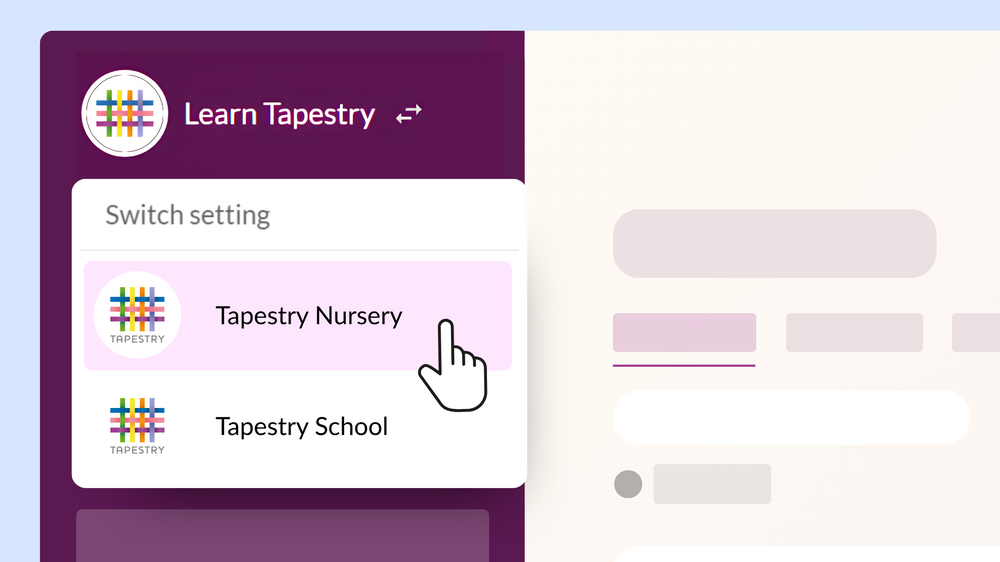
You can now quickly switch between Tapestry settings if you are linked to more than one account. If you log in to multiple accounts using the same email address, you’ll be able to see the other settings you are linked to by clicking the switch icon 🔁 at the top of the sidebar, next to the name of the setting you’re currently logged into. If you log in using a different password, you’ll see a padlock symbol next to the setting name. This means you’ll need to enter your password before completing the switch. Note: This feature is not available for PIN-only staff or child login. The following updates are also now available on Tapestry. New Birth to 5 reference material within the EYFS flagset Montessori activity descriptors are now visible The ‘Manage Groups’ page has had a redesign for improved user experience Care Diary form PDF exports now include the ability to see whether the relative signed this off on their own device or setting device The Accident tracking screen has been reintroduced allowing the ability to export a single PDF detailing all accidents during a time period. To navigate to this screen - Planning & Monitoring > Care Diary > Accident Tracking. Online Child Register – there will now be a collected/dropped off field. This needs to be turned on first through Management System > Configuration > Registers. Online Staff Register – staff and pin only users will not be able to edit their own in/out time This update also includes minor bug fixes and user interface improvements for a smoother experience.
-
The following enhancements are now available on your Tapestry account. Ability to filter the Care Diary by children who are booked in that day Ability to choose to show children's ages in years and months as opposed to just months through the Management System > Config > Display Preferences Ability to navigate comments in the Care Diary by a week instead of a day Ability to see the total number of children in a ‘Room’ per day within the daily bookings screen (Management System > Rooms) Ability to filter Relatives by group through the Manage Relatives page When deactivating children, there will be a warning if there are any active schedules and encourage you to add an end date Ability to duplicate a Planned Medication within the Care Diary Other Updates This update also includes minor bug fixes and user interface improvements for a smoother experience.
-
A new update to the Tapestry Education Platform app (v1.0.7) is now live across all operating systems. This update includes: Fix for duplicate observations issue Fix for freezes with large journal downloads Fix for wrong documents being deleted from add/edit observations screen Occasional app review prompt General improvements If your app is not set to update automatically, please download the latest version from your device’s app store. Please note: On Amazon devices, the update may take up to 24 hours to appear.
-
A new update to the Tapestry Education Platform app (v1.0.6) is now live across all operating systems. This update includes: Ability for relatives to download their child’s PDF journal through the app Ability for relatives to purchase a printed book of their child’s journal through the app General improvements and fixes If your app is not set to update automatically, please download the latest version from your device’s app store. Please note: On Amazon devices, the update may take up to 24 hours to appear.
-
We’ve released two new updates to Tapestry designed to give you more control over your account and make managing your data even simpler. New Account Management section We’ve introduced a new Account Management area, giving managers more control over subscriptions without needing to contact Customer Service. You can now find this in: Help > Account > Account Management. From here, managers can: Upgrade your subscription Downgrade your subscription Add the Wonde integration These actions can now be completed within your account, making it quicker and easier to manage your subscription. Learn more MIS integration via Wonde You can now connect Tapestry to your MIS using Wonde, allowing you to automatically sync key parent and child data. This integration supports systems such as Bromcom, Arbor, and SIMS, and helps keep your records up to date with minimal manual input. Once enabled, the following data can be synced: Parent data (e.g. name, email address, relationship to the child) Child data (e.g. name, date of birth, classroom group, profile picture) The integration is optional and is not enabled by default. Please note: As this is a Wonde integration (rather than a built-in Tapestry feature), there is a small annual fee of £60 to enable and maintain the secure connection. Learn more
-
You can now log accidents at home, medication and incidents on Tapestry, and request digital sign-off from parents and carers from their own devices (requires a manager to choose a preference). This new feature is available on the updated app (v1.0.5) and also on the browser. You’ll be able to: Record accidents that have happened at home Add, administer and archive medication Record incidents for child or between children To learn more, you can visit our dedicated support page here. The app update also contains: Bug fixes General improvements If your app is not set to update automatically, please download the latest version from your device’s app store. Please note: On Amazon devices, the update may take up to 24 hours to appear.
-
Tapestry Pay is now available for all settings and schools using Tapestry’s Nursery Management System in the UK. Tapestry Pay allows parents and carers to pay invoices directly within Tapestry using: Credit or debit card Google Pay or Apple Pay Bank transfer Tax-Free Childcare Payments made through Tapestry Pay are automatically reconciled on the setting or school’s side, helping to reduce admin time. To learn more about Tapestry Pay and how to set it up, please visit the dedicated support page: Tapestry Pay Tapestry Pay (and the full Nursery Management System) is included as part of your subscription. However, please note that transaction fees apply to payments made using this feature, full details can be found here.
-
A new update to the Tapestry Education Platform app (v1.0.4) is now live across all operating systems. The latest Tapestry app update includes: Faster media upload speeds The underlying code infrastructure for the upcoming Tapestry Pay feature This update also includes a number of bug fixes and general improvements. If your app is not set to update automatically, please download the latest version from your device’s app store. Please note: On Amazon devices, the update may take up to 24 hours to appear.
-
Pin observations
VannaTapestrySupport replied to Claire_Stemp's topic in Weavers Future Development Suggestions
Morning Felicity, I'm afraid it's not a feature that is available just yet. The more interest we have for a feature, the higher up our priority list it goes. I have made a note of your interest so we can keep you updated with any developments. Let us know if there is anything else :) -
We’ve introduced some highly requested improvements to our Nursery Management System. New: Multiple age ranges & staff ratios per room You can now set multiple age ranges within a single room. Tapestry will automatically calculate staff requirements based on the different ages of children in that room, helping you manage ratios more accurately and efficiently. Setting up rooms with multiple age ranges. New: Xero and QuickBooks integrations Tapestry now supports exporting invoicing data for use with Xero and QuickBooks. Simply export your invoices as a compatible CSV file and upload it directly into your accounting software for reporting and bookkeeping. Get started: Configure your account for accounting software. Export invoicing information for accounting software. Updated: Invoice format improvements Invoices have been refreshed to remain compliant with updated regulations requiring additional charges to be clearly itemised. A new summary section has been added to present itemised information clearly without creating multiple invoice pages. This section highlights: Regular sessions Extra bookings Custom charges Learn more about the new invoice layout.
-
nursery Closure Days / Bank Holidays
VannaTapestrySupport replied to SAPLINGSNURSERY's topic in Early Years Setting Management
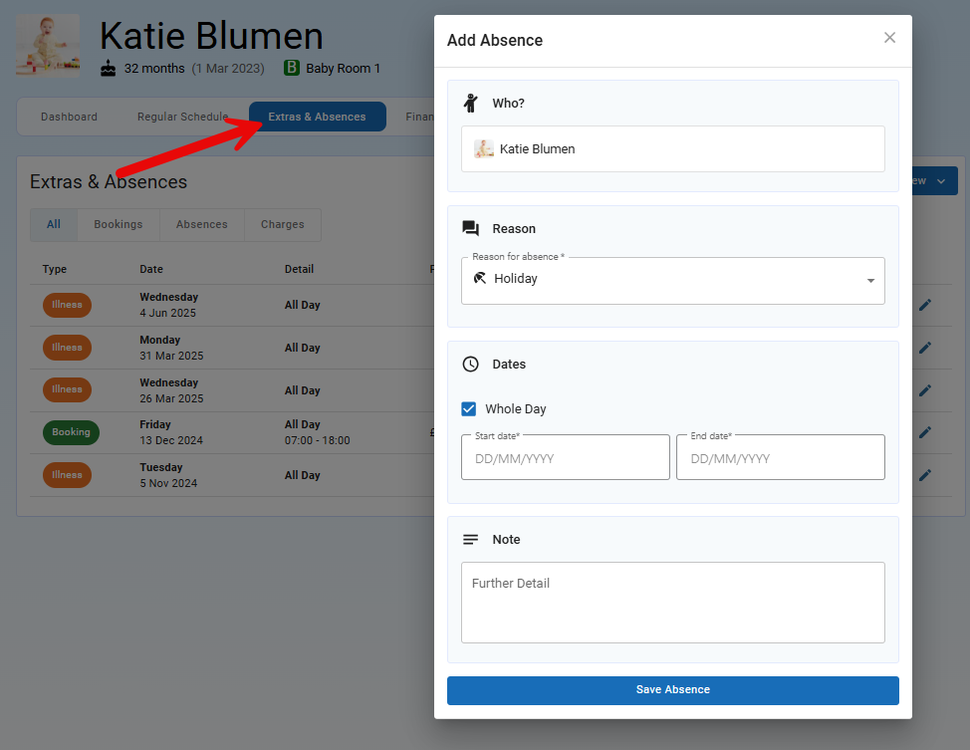
Hi, When you create a child's schedule, you'll have the option of selecting whether they attend during school holidays or not, please see below: If you charge for training days, bank holidays etc. once you have added these as a school holiday (Config > School Holidays and Closures), then any child with this box ticked and has a booking that falls onto one of these days, will still be charged. If a child is on holiday and therefore absent, if you do not know of this in advance you can mark them as absent on the register. Alternatively, if you know of these holidays in advance, you can add their absence through the child's 'Extras and Absences' tab. Please see below: This will then note the child's absence, but again if they have a booking that falls within this period, they will still be charged. I hope this clarifies things. Best wishes, Vanna
-
nursery Closure Days / Bank Holidays
VannaTapestrySupport replied to SAPLINGSNURSERY's topic in Early Years Setting Management
Hi, When setting up your closures and school holidays, please bear in mind that closures are not charged for, therefore if you do charge for these then you you'll need to set these up as a school holiday, but can name it 'Bank Holiday' for example. If children are still charged within these periods, then when you create their schedules you'll need to be sure to tick the 'Attends during school holidays box'. With regard to children going on holiday, if you still charge them then ticking this box will take bookings that fall into this period into consideration. However, when they are actually absent during this period, you will need to mark the absence on the register where you can add the reason for it, such as holiday within the notes. Absences are always charged for. The child's attendance will then reflect accurately through the attendance reporting screen as well as in the absence export. You can read more about adding and editing your closures and holidays in this guide here. Best wishes, Vanna -
Hi Emma, Apologies for the delay in getting back to you about this feature request! The Care Diary feature is available via the IOS app. The Care Diary can be made visible to relatives by enabling it for them to view. This can be done through the Control Panel (or Configuration if you're using the new look) > Features > Care Diary > Care Diary Settings > and tick 'Enabled for relatives'. Then when relatives login, they'll be able to view any entries you have made for their child throughout the day. Please note, if you also tick 'Staff must approve relative access to entries', then you'll need to approve the entry before the relatives will be able to see them through their account. Feel free to pop any further queries to customer.service@eyfs.info. Best wishes, Vanna
-
Hello, I'm afraid we don't have a time frame on when this feature will be released. However we will be sure to update you on this post as soon as it is! Best wishes, Vanna
-
Hi Abigail, Thanks for getting in touch! If you have added 'food' as an extra charge, and this is part of a child's regular schedule, then you'll be able to create a new schedule for the period they are on holiday. When creating the schedule for that week/s, just be sure to remove the extra charge of food. If their current schedule doesn't have an end date, this will pick back up after the holiday schedule has ended. You can read more about adding a new schedule by clicking here. Get in touch with us on customer.service@eyfs.info for any further support.


