


OlayaTapestrySupport
-
Posts
340 -
Joined
-
Last visited
-
Days Won
1
Content Type
Profiles
EYFS Articles
Local Authority
Newsletters
Topic support
Book recommendations and reviews
Courses and events
Vacancies
Help documents
News items
Tapestry Newsletters
Podcasts
Tapestry Import
Forums
Downloads
Events
Gallery
Store
Everything posted by OlayaTapestrySupport
-
A new update to the Tapestry Education Platform app (v1.0.2) is now live across all operating systems. This release focuses on performance improvements and bug fixes to make everyday use smoother and faster, particularly when working with media. What’s improved: Media uploads now display progress, so you can see exactly how they’re progressing Faster uploads for media captured within the app Improved loading speeds when navigating throughout the app If your app is not set to update automatically, please download the latest version from your device’s app store. Please note: On Amazon devices, the update may take up to 24 hours to appear.
-
 The child login portal, used by older children to access and contribute to their own journals, has now been updated to match the new Tapestry look and feel. We’ve also released a number of background performance improvements to make your overall experience faster and smoother.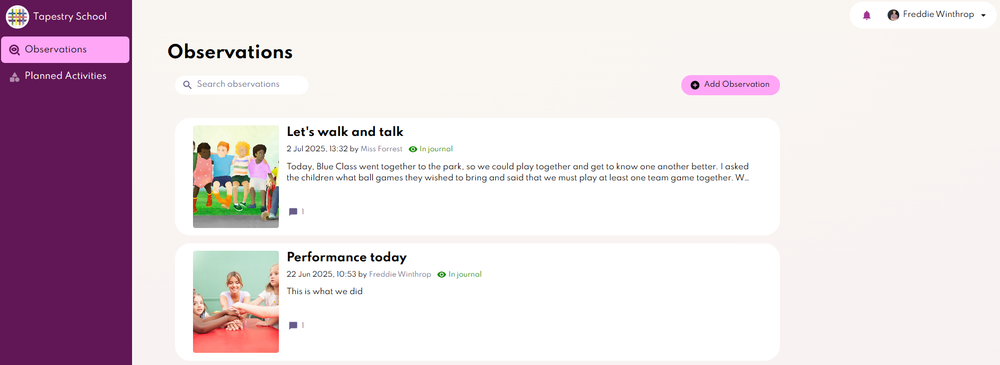
-
A new update to the Tapestry Education Platform app (v1.0.1) is now live across all operating systems. This update includes the following improvements: You can now zoom in on photos Links to external websites are now clickable We’ve also made several behind-the-scenes improvements and bug fixes to enhance your overall experience. If your app is not set to update automatically, please download the latest version from the App Store, Play Store, or Amazon Appstore. Please note: For those using Amazon devices, the updated app will show within 24 hours.
-
The new Tapestry app is now available to download from the Amazon Appstore. The new app is called Tapestry – Childhood Education Platform. Download the app for Amazon Fire devices This new app fully replaces the previous version of Tapestry. We've created user guides to help you get familiar with the new app. For information about minimum operating system requirements and the status of the old app, please visit our FAQs section.
-
The new Tapestry app is now available to download from the Apple App Store and Google Play Store. An Amazon Fire version is arriving very soon, so stay tuned. The new app is called Tapestry – Education Platform. Download the app for Apple devices Download the app for Android devices This new app fully replaces the previous version of Tapestry. We've created user guides to help you get familiar with the new app. For information about minimum operating system requirements and the status of the old app, please visit our FAQs section.
-
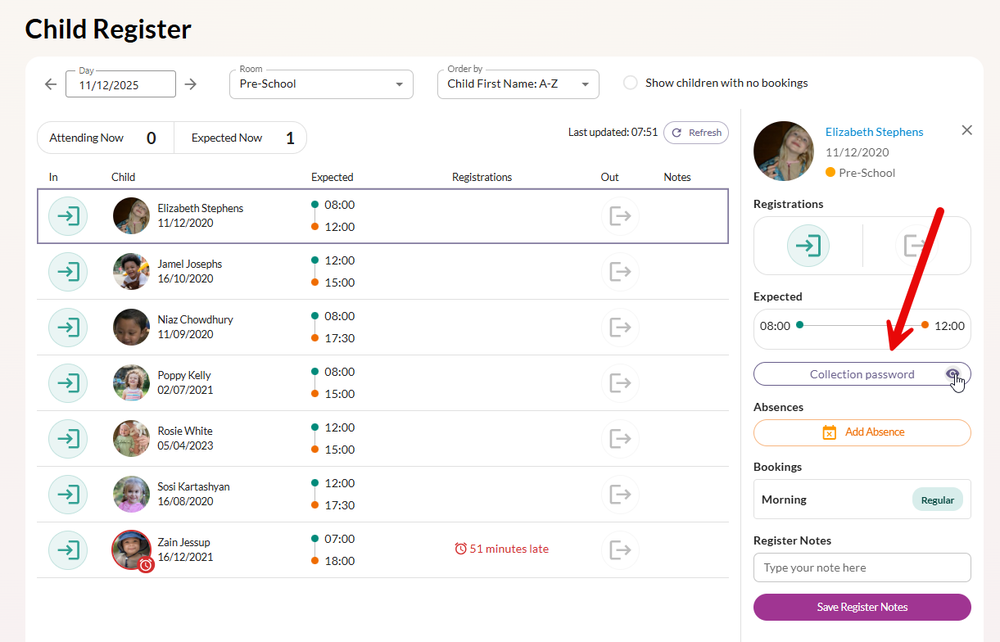
The following features and updates are now available in your account: Funding Allocation Report View a breakdown of funded and unfunded hours for each child, including funding type, rate, and total value. As with all other reports, you can export a CSV copy. Learn more about it on the Management System Reports tutorial. Room Moves Reports Displays all upcoming room moves, showing each child’s move date, name, DOB, current and future room, and age at the move. Filters and CSV exports are available. Learn more about it on the Management System Reports tutorial. More Compact Printed Registers We’ve added new settings to reduce printed registers’ page count, including smaller fonts and options to remove page breaks. Universal Credit Compliant Payment Invoices and Receipts Paid invoices now clearly show payment date and method (BACS, cheque, card, TFC, etc.). Email receipts include the child’s name, and custom text (e.g., address, Ofsted number) can be added from Management System > Config > Payments. Collection Passwords on Register Tap a child’s name on the register to view their collection password. Quick Access to Child Dashboards from Register Managers can tap a child’s name on the register to open their dashboard. Other Updates This update also includes minor bug fixes and user interface improvements for a smoother experience.
-
Alongside annualised invoicing, we also released a few other updates and improvements to Tapestry's Nursery Management System. These include: Allowing users on mobile and tablets to enter negative and decimal line items when creating an invoice Itemising funded hours separately on invoices to make billing more transparent for families Providing the option to hide inactive children when looking at your account balances
-
You now have a choice of three calculations to use when invoicing families: Actual charges: This is the current approach and the default one. The invoice will be based on the actual charges that fall within its date range Fixed monthly fee: The cost of regular schedule bookings and charges will be replaced by a set fee that you choose. Extra bookings and ad hoc charges will be charged separately. Annualised monthly fee: The cost of regular schedule bookings and charges are annualised based on the number of chargeable weeks and number of months to be invoiced. This is calculated by Tapestry. Extra bookings and ad hoc charges will be charged separately. You can use any of the three types of calculations for each child in your setting, which gives you the flexibility you need. See how to put it in action: Invoices: Setting your invoice calculation method Annualised invoicing is part of Tapestry’s multi-functional Nursery Management System, included in every subscription.
-
The new Cherry Garden Monitoring Screen is now live! This screen helps educators reflect on their learners' engagement and progress while adapting their provision to support every child confidently. As your children and provision develop, Tapestry builds a timeline of the actions taken so you can evaluate the impact of your adaptations. Learn how to use the Cherry Garden Monitoring Screen Find out more about the Cherry Garden Branch Maps, a flexible SEND assessment tool
-
Attendance reports for children are now available as part of Tapestry's Nursery Management System! Set a custom date range, filter by room, and easily view a child's: Number of days booked Number of days attended Attendance % Absence % Number of illness days Number of holidays 'Other' absences You can also export the data into CSV for your records.

-
You can now export a child's absences! This might be especially helpful for auditing purposes, for example. You can export it for: A specific child A specific room All your children And it will include inactive, enrolling and partially deleted children. Check out how to export child absences.
-
You can now generate and send invoices in bulk - save even more time with Tapestry's easy-to-use Nursery Management System! You'll spot a 'bulk invoice' button in your 'Invoices' area:

-
As part of our continuous effort to further develop Tapestry's Nursery Management System we have recently released a new feature: The weekly room view now forecasts available spaces, so you can easily manage your occupancy and offer ad hoc sessions to the families in your community.

-
We have released an update for Android users. This is a small update without any new features, but it should improve your overall experience with the app.
-
Parents and carers with active Tapestry profiles can now easily export and download PDF copies of their children’s journals directly from their accounts — no need to rely on a manager anymore! This update is designed to make things easier for you, reducing your workload when a child’s time with you comes to an end. Exporting journals now becomes one less task on your to-do list. Plus, with this feature, parents can customise their PDF export with specific dates, observation types, and more — giving them the flexibility to order a professionally printed journal that’s tailored exactly to their liking. Want to find out more about this feature? Discover what this means for you.
-
- 1
-

-
Parents and carers set as bill payers on Tapestry can now easily access their invoices and account balances directly from their account. What does this mean? Bill payers will be able to view their invoices both from the browser version of Tapestry and the app. The statement will clearly display how much they owe or any credit they have. They’ll be able to download a PDF copy of their invoice. They’ll be able to see any previous charges and payments. You can share the below tutorials with parents and carers through a Tapestry Memo to let them know about this: Receiving and viewing invoices through Tapestry How to view invoices on the iOS app How to view invoices on the Android app
-
This is a development of Tapestry Invoices, part of our ever-growing management system tools. Invoice Discounts allow you to: - Create custom discounts - Add them to your children's billing profiles - Apply to: Regular schedules Extra bookings Extra charges What's best, once added to a child's billing profile the discount will be automatically applied in all new invoices. If you want to stay up to date with further nursery management tool developments, sign up to our newsletter.

-
- 1
-
-
You can now add a body map whenever you create an accident entry from the browser version of Tapestry or the Android app. Simply select ‘add body map’, circle the injured area, and save! You can learn how to add Body Maps below: How to add a body map to an accident entry Adding body maps to accidents on the Android app
-
The latest update to the Android/Fire app update is now out (version 4.1.2 ). This is for those of you using the Tapestry app on Android devices and Amazon Fire devices. You can now use the Android and Fire Tapestry apps to add assessments to your observations using any of your Bespoke Frameworks. This update also contains quite a few bug fixes meaning your experience with the app should be smoother and generally better. We are also ending support for Android 4.4 (and below). If you are using Android 4.4 or below you will still be able to use any previous app versions, but will not be able to update to 4.1.2 or any future upgrades. Some of you will be automatically upgraded to it and some of you will need to upgrade yourself from the Play Store. Please note that the release will be rolled out over the next few days, so if you are set up for automatic upgrades this might not happen for a couple of days.
-
Attendance Register
OlayaTapestrySupport replied to carolyn_cresswell's topic in Tapestry user conversations
Hi TheLittleFirefly, First of all, thank you so much for your patience so far. We are very excited to confirm that Phase 1 of Tapestry's Management System is coming in Summer 2022. This 1st Phase will include a Booking system, so you can book your children in on your custom-made rooms/sessions. From this Booking system, you will then be able to generate a register for each room/session and print it out for attendance records. Digital registers will follow shortly after Phase 1. All Management System features will be completely free to all Tapestry accounts. We will be announcing the release of Phase 1 and all other phases through our usual channels: The change log Our Twitter account @Tapestry_FSF Our Facebook page Tapestry Online Learning Journal The coloured boxes in the tapestryjournal.com login page A yellow banner inside all manager and staff Tapestry accounts The subsequent Tapestry Newsletter (you can register to receive these directly in your inbox) So please make sure you follow us on SM, bookmark the change log, subscribe to the newsletter or keep an eye on the login page coloured boxes 😊 Best wishes, Olaya -
Hi paulkerton, First of all, welcome to the Forum! I am afraid that it is not possible to set 'staff view only' as the default option. However, staff members can simply update this from the options box as they create the observation. As it stands right now, all observations will be automatically set to 'not in journal'. If you want the actual assessments that you might have added to these observations to count towards your monitoring screens, then that is possible. All you need to do is go to control panel > settings > summative assessments > and then tick the box at the top that reads 'Include assessments from unapproved observations'. Do make sure to save the changes! From then on, assessments from unapproved observations will feed through to the monitoring screens, and you will still be making sure that relatives do not see these observations until you are ready to publish them. Would this work for you? Best wishes, Olaya


